
iOS
On iOS WKWebView ships with the OS, so the engine floor is an OS floor: the default min_ios("16.4") is Safari 16.4, where @property shipped. The only fix for a below-floor device is an iOS update.
What is checked
ProcessInfo.operatingSystemVersion, as major.minor.patch — ProcessInfo rather than UIDevice, because it is safe to read off the main thread, where Tauri dispatches plugin commands. It is compared with min_ios inclusively, minor included.
The user agent is not used. On the iOS 26.5 simulator WKWebView's user agent said iPhone OS 18_7: user-agent parsing would have misreported that device by eight majors.
Below the floor
- The WebView is stopped, blanked with an empty document, and hidden, in
load(webview:). Tauri's navigation hook then refuses the app's navigation when WebKit asks for its policy. - A
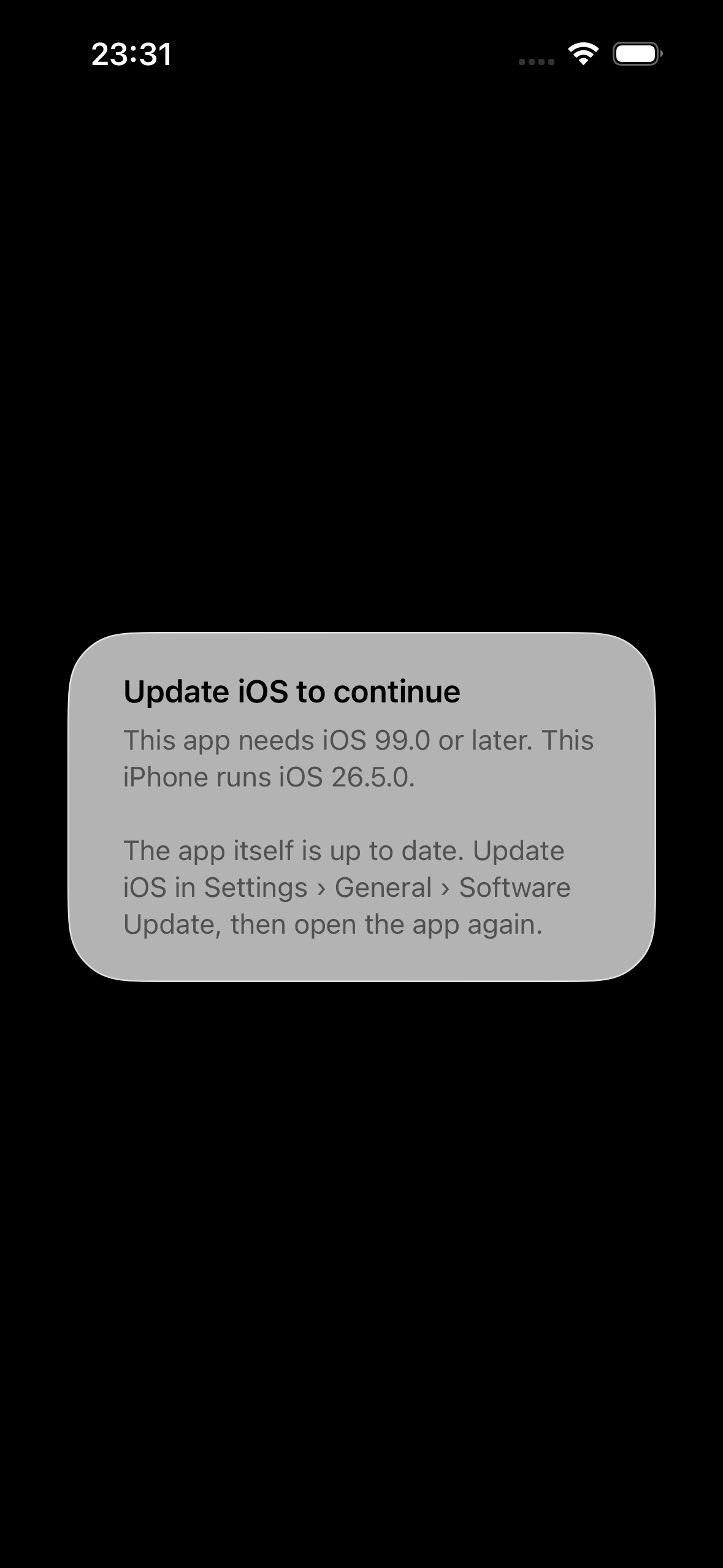
UIAlertControllersays to update iOS. If the root view controller is not in a window yet, the guard polls the run loop (every 25 ms, up to 200 times) until it is: presenting on a detached controller would silently show nothing. - The alert has no buttons: iOS has no public URL that opens Software Update (
openSettingsURLStringopens this app's own settings page — a dead end dressed as a way forward), and apps are not meant to quit themselves. openUpdate()returnsunsupported— WKWebView has no store listing.
What the user sees first is a black window (the hidden WebView), then the alert: 0.16 s from plugin construction to alert on the iOS 26.5 simulator.
The deployment target is the real defence
In-app, the guard can only explain. The fix for iOS is not to install at all on a version that cannot render the app — which the App Store does for you if the deployment target says so. Tauri 2.11.6's default is 14.0 (tauri-utils's ios_minimum_system_version at tag tauri-v2.11.6; the dev branch already says 15.0, so anything documented from dev will not match what you ship). Either way it is below 16.4. Set it:
{ "bundle": { "iOS": { "minimumSystemVersion": "16.4" } } }The trap: that key only takes effect on the first tauri ios init
The CLI writes gen/apple/project.yml only if it does not already exist (crates/tauri-cli/src/mobile/ios/project.rs at tauri-v2.11.6), and no later tauri ios build touches IPHONEOS_DEPLOYMENT_TARGET. Change the key on an existing project and nothing happens — silently. Reproduced on this repository's example: init at 16.4, change to 17.0, re-init → still 16.4.
The reliable route is bundle.iOS.template, which tauri ios init renders with File::create — every time:
{
  "bundle": {
    "iOS": {
      "minimumSystemVersion": "16.4",
      "template": "src-tauri/ios-project.yml.hbs"
    }
  }
}
with ios-project.yml.hbs a copy of Tauri's own template for your Tauri version (a Handlebars template, not YAML until rendered — hence the .hbs, which also keeps YAML linters off it; the example carries 2.11.6's verbatim: examples/tauri-app/src-tauri/ios-project.yml.hbs). Then re-run tauri ios init after every change to the key, and check:
grep -m1 IPHONEOS_DEPLOYMENT_TARGET src-tauri/gen/apple/*.xcodeproj/project.pbxprojNote the path: the template is resolved against the directory you run the CLI in, not src-tauri/. "template": "ios-project.yml" fails with "failed to read custom Xcode project template" when run as npm run tauri from the frontend root. Both behaviours measured: docs/verification/logs/ios-trap/.
Devices that stop at iOS 15 (iPhone 6s/6s Plus, 7/7 Plus, SE 1st generation, iPod touch 7th generation) can never reach 16.4; for them the deployment target is the only honest answer, and the in-app alert is a dead end by nature.
Forcing the alert on a current simulator
The example reads a floor override from the launch environment (a compile-time variable does not survive the Xcode build phase that invokes cargo):
npm run tauri ios init
npm run tauri ios build -- --debug --target aarch64-sim
xcrun simctl install <udid> "src-tauri/gen/apple/build/arm64-sim/webview-guard example.app"
SIMCTL_CHILD_WEBVIEW_GUARD_EXAMPLE_MIN_IOS=99.0 xcrun simctl launch <udid> app.vaam.webviewguard.example
Not measured
No iOS 16.3 runtime was available, so the below-floor path was exercised only with the floor forced on iOS 26.5 — see device verification.